
CRM-ERP
Mobile App
SaaS
Field Operations
Product ZenTrades
ZenTrades needed a scheduling feature for dispatchers and field technicians. CRM data and platform gaps showed that visibility into who was working where, and when, was missing entirely.
Details
Mobile + Tablet app
Mobile + Tablet app
Product Designer
User Experience Design
Design System Management
User Testing
Team Members
Product Manager
CRM-ERP ∙ Visual & Motion Design ∙ User Research ∙ User Testing
Scope
Problem Blind Spots in the Field
Technicians were assigned jobs from the back office, making coordination slow and difficult to manage, especially for smaller teams. Dispatchers had no visibility into technician calendars or live locations, leading to double bookings, idle time, and poor job assignments. Without a real-time scheduling system, response times suffered, and managers had no way to react quickly to what was happening in the field.
Solution Three Views, Full Visibility
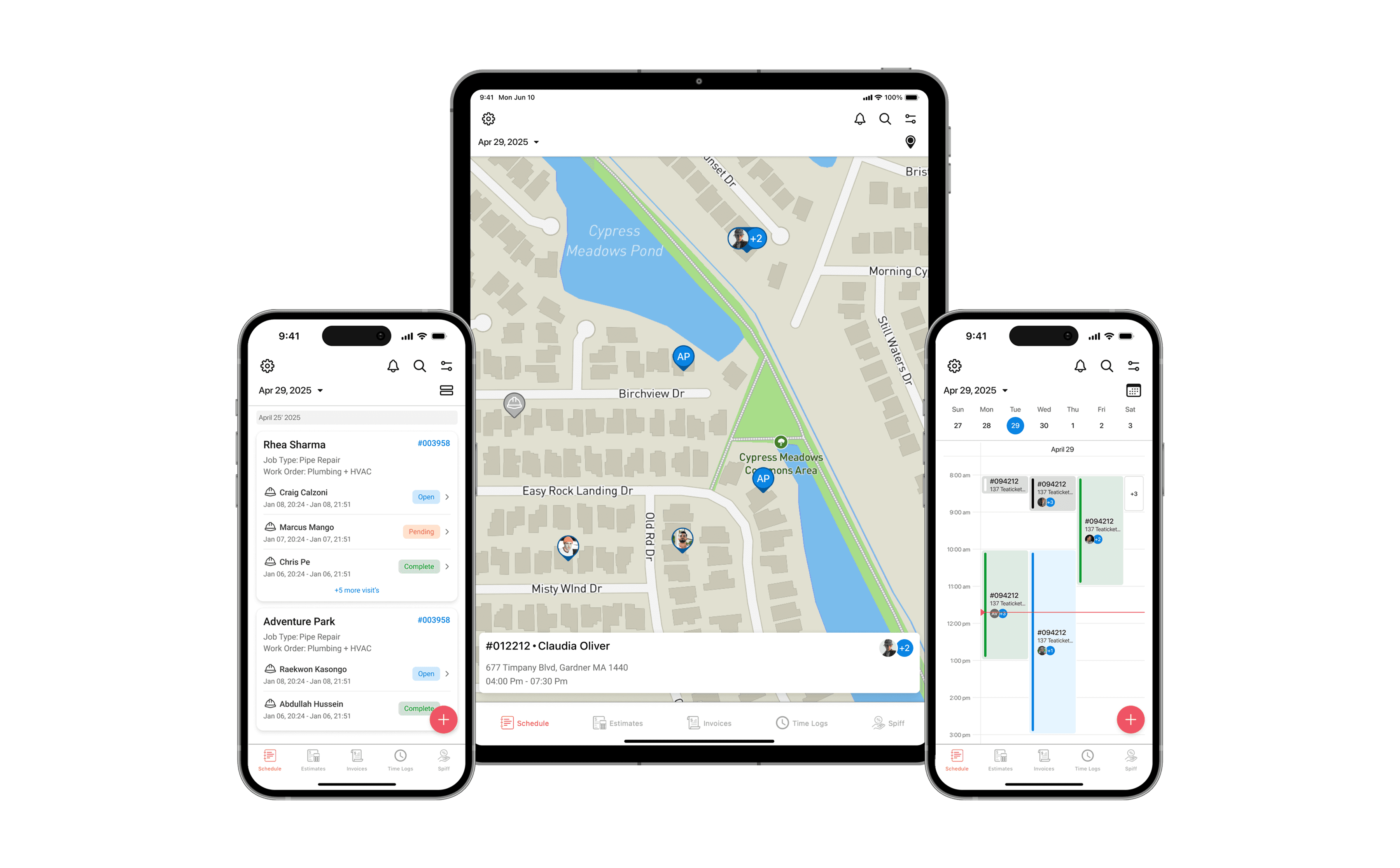
Designed a scheduling system with three views: list, map, and timeline. Giving dispatchers real-time visibility into technician locations and availability to assign jobs faster and more accurately.
Result Best in Class, Proven in the Field
The scheduling feature drove a 37% increase in sales among field users. It became the strongest differentiator in the market, improving customer retention. Managers could now assign and manage technicians directly from the field, cutting idle time and lifting team productivity.
Projected Impact Validated from mixpanel metrics
33%
Growth in new customer acquisition
Scheduling became the key feature that brought new users to the platform
86%
Of managers moved to mobile scheduling
Field-first adoption replaced back-office coordination entirely
2x
Faster same-day job assignments
Managers could assign directly from the field without back-office calls
COntext
ZenTrades app is a field service SaaS platform for managing jobs, technicians, and operations.
Scheduling had been in the pipeline for a while, but consistent customer feedback made it clear it couldn't wait. I picked it up from scratch. A basic list view existed, but there was no real scheduler. iOS had nothing, Android was broken, and all job coordination still ran through the back office. The goal was to build a scheduling system that finally worked for dispatchers and technicians in the field.
Problem
Scheduling was broken across platforms. No live tracking, no visibility, and all coordination running through the back office. CRM data confirmed it: missed jobs, technician delays, and uneven workloads. Competitors had already made real-time scheduling a baseline. ZenTrades hadn't.
Technicians were assigned jobs from the back office, making coordination slow and difficult to manage, especially for smaller teams. Dispatchers had no visibility into technician calendars or live locations, leading to double bookings, idle time, and poor job assignments. CRM data confirmed recurring patterns: missed scheduling opportunities, technician delays, and uneven workload distribution. Competitors had already set real-time tracking and manager visibility as the baseline. ZenTrades had neither. A cross-platform scheduler with live tracking wasn't a nice-to-have, it was overdue.
Goals + North Star
To build the most capable field scheduler on the market, and make it the reason customers choose ZenTrades.
Win on Experience: Design a scheduler so intuitive that field managers never need to fall back to the back office.
Drive New Revenue: Make scheduling a flagship feature that converts prospects and justifies the platform.
Full Week Visibility: A multi-day view that gives managers a clear picture of upcoming assignments, coverable in two swipes.
Own the Category: Outpace competitors on real-time dispatch, live tracking, and cross-platform availability.
Process + Key Insights
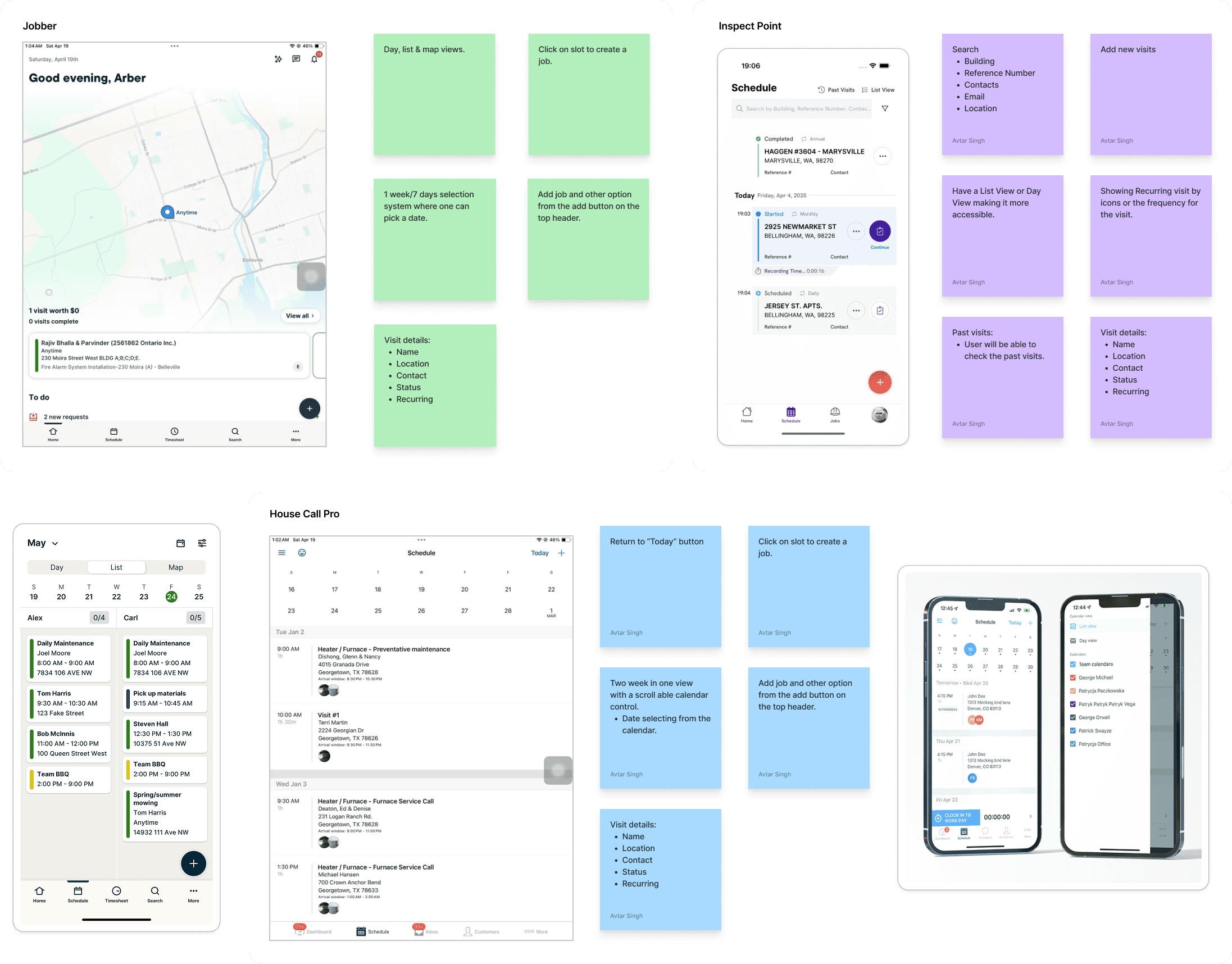
I interviewed 23 technicians and managers, dug into CRM analytics, and ran a competitor analysis to map where scheduling was breaking down and what the market already expected.
Key Insight 1: No Cross-Platform Parity. iOS had no scheduler at all. Android users were stuck on outdated PWA flows with high drop-off rates. The product had a fundamental gap before any workflow issues were even considered.
Key Insight 2: Dispatchers Were Flying Blind. Managers had no visibility into technician calendars or live locations. Every assignment required back-office coordination, slowing down same-day job responses significantly.
Key Insight 3: Competitors Had Already Moved. Real-time tracking and live dispatcher visibility were baseline expectations in the market. ZenTrades lacked both, making it easy for competitors to win on features alone.
Workflow Efficiency
Multiple views and real-time sync cut steps to assign or reschedule jobs. Quick job creation via slot selection or the add button.
Feature Set
Live technician tracking with location-aware job assignment. Full visit details, including status, history, and recurring jobs.
User experience
Mobile-first design with minimal taps and calendar-based navigation. Map-based assignment with visual cues for job status and proximity.
Market Differentiators
Competitors lack cross-platform consistency and real-time field visibility. Few tools give managers the ability to dispatch directly from mobile.
Solution
A scheduler built around how dispatchers actually work, not how the back office assumed they did. The map defaulted to what mattered most: your next job, your current site, your team. Three views, one consistent system, with filters that never broke when you switched between them.
The core challenge wasn't just building three views. It was deciding what each view needed to do and what data belonged where.
Multi-day view gave managers full week visibility across their team, reducing manual check-ins and back-office calls. Visit stacking and job status cues made workload distribution readable at a glance.
Map settings let managers control what appeared on screen, cutting visual noise for teams that didn't need every data point visible at once.

List View
Your day, in order
A chronological view of every job assigned for the day. Technicians can scan upcoming visits, check job status at a glance, and tap into full job details without leaving the flow. Built for quick reference before heading to the next site.
Calendar View
The right person, at the right time.
A chronological view of every job assigned for the day. Technicians can scan upcoming visits, check job status at a glance, and tap into full job details without leaving the flow. Built for quick reference before heading to the next site.


Map View
See the field, own the field
The map view gives dispatchers a live picture of where every technician is. When an unassigned job comes in, managers can instantly spot the closest available technician and assign them on the spot. Technicians can also see who else is working at the same site, keeping everyone in sync without a single call.

Reflections
Job creation needs a system, not just a flow
In a calendar view, deciding which event takes priority when creating or assigning a job required thinking through dozens of edge cases. Which slot gets locked first? What happens when two jobs overlap, and how a new assignment lands without breaking what's already there.
Schedulers are harder than they look
Building a mobile calendar that handles overlapping events, multi-day visits, and status states made me understand why Google and Apple Calendar are engineering feats. Every edge case on mobile is a deliberate design decision, not an afterthought.
Maps are fully designable
I didn't know how much control you have over a map until I customised every visual detail and exported it as JSON for implementation. The map in this product is entirely intentional, built from scratch to fit the product, not a default style.
Thank you. To understand more in-depth, let's connect.